Quiz List
View and manage all your generated quizzes
The Quiz List is your central hub for viewing and retaking all the quizzes you've generated. Track your progress, review past attempts, and manage your quiz library.
Accessing the Quiz List
From a Specific Note
Navigate to any note from the Notes tab.
Tap the Study Tools tab.
Tap the Quiz card to see all quizzes generated from this note.
Quiz List View
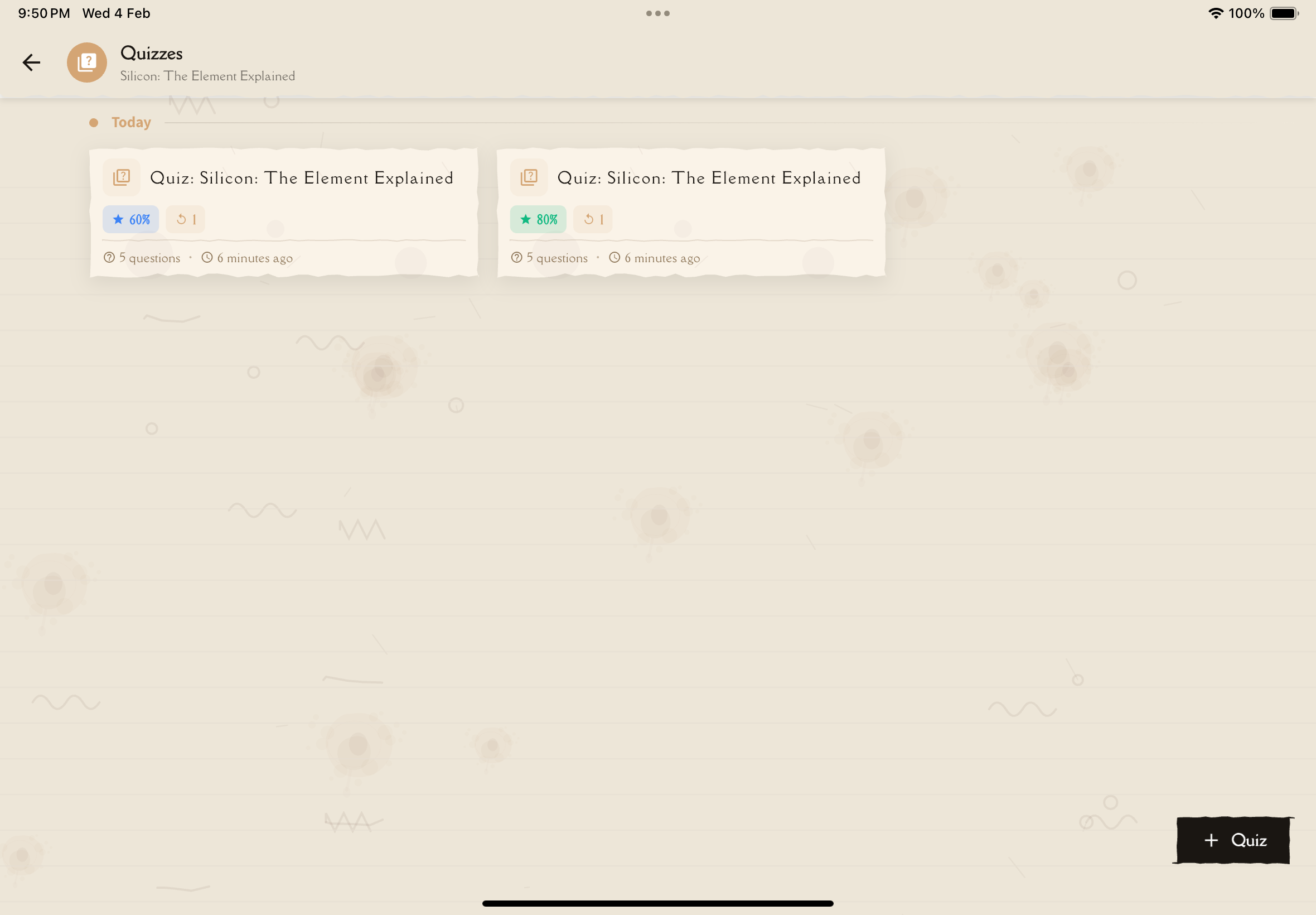
Quizzes are organized by timeline groups (Today, Yesterday, This Week, etc.) and sorted with the most recently created quizzes first.
Each quiz is displayed as a card showing:
Quiz Information
Title: Auto-generated based on note content (e.g., "Photosynthesis Quiz #1")
Question Count: Total number of questions (e.g., "15 questions")
Date Created: When you generated this quiz
Performance Metrics
Best Score: Your highest score on this quiz
- Displayed as percentage (e.g., "86%")
- Color-coded:
- Green (80%+): Excellent
- Blue (60-79%): Good
- Amber (40-59%): Needs more work
- Red (below 40%): Needs significant improvement
Attempt Count: How many times you've taken this quiz (e.g., "3 attempts")
Aim to retake quizzes until you consistently score 80%+. This indicates solid mastery of the material!
Quiz Actions
Start/Retake Quiz
Tap the quiz card to start or retake the quiz:
- First time: Start fresh attempt
- Subsequent times: Retake with the same questions
Your previous attempts are saved—retaking doesn't erase history.
Delete Quiz
Access the menu on a quiz card and tap Delete:
- Removes the quiz and all attempts
- Cannot be undone
- Note content remains intact
Use when:
- Quiz no longer relevant
- Generated by mistake
- Decluttering quiz library
Quiz Statistics
When viewing all quizzes (not filtered by a specific note), you'll see overall statistics at the top:
- Total quizzes: Number of quizzes you've created
- Total attempts: How many times you've taken quizzes
- Average score: Your mean score across all completed attempts
- Time spent: Total time spent taking quizzes
Retaking Quizzes
Why Retake?
Spacing effect: Taking the same quiz days/weeks later strengthens long-term retention.
Mastery validation: Ensure you truly understand, not just got lucky.
Confidence building: Improving scores boosts confidence before exams.
Gap identification: New attempts may reveal gaps you missed the first time.
Retake Strategies
Immediate retake (same day):
- Only if score was very low (<50%)
- Review the note first
- Focus on understanding explanations
Next-day retake:
- Ideal for consolidation
- Don't cram—natural spacing works best
Weekly retake:
- Test long-term retention
- Part of spaced repetition schedule
Pre-exam retake:
- Final confidence check
- Identify last-minute gaps
Your goal isn't to memorize the exact questions—it's to understand the underlying concepts. If you score 90% on a retake by memorizing answers, generate a new quiz to test real understanding!
Best Practices
Quiz list management tips:
- Review regularly: Check quiz list weekly to see which quizzes need retaking
- Focus on low scores: Prioritize retaking quizzes below 75%
- Space retakes: Don't retake immediately—allow 1-3 days for memory consolidation
- Generate variety: Multiple quizzes per note = better coverage
- Clean up old quizzes: Delete outdated or irrelevant quizzes to reduce clutter
- Track trends: Watch for improving scores—that's real learning!
- Set goals: Aim to get all quizzes above 80% before exams
Tips for Different Study Phases
Early Study Phase
What to do:
- Take each quiz once for diagnostic
- Don't worry about low scores
- Identify weak areas
- Focus on learning, not scores
Don't:
- Retake immediately
- Feel discouraged by low scores
- Skip reviewing explanations
Active Study Phase
What to do:
- Retake quizzes with low scores
- Space retakes by 2-3 days
- Track improvement trends
- Generate new quizzes for variety
Don't:
- Memorize specific questions
- Ignore explanations
- Retake too frequently (spacing matters!)
Exam Prep Phase
What to do:
- Focus on quizzes still below 80%
- Review all explanations
- Generate final practice quizzes
Don't:
- Cram all quizzes in one day
- Skip quizzes you think you know
- Forget to review correct answers too
Troubleshooting
Can't find a quiz
Solutions:
- Scroll through timeline groups—it may be in an older section
- Verify you're looking at the correct note
- Check if quiz was accidentally deleted
Quiz shows wrong score
Possible causes:
- Displaying best score vs latest score
Solution:
- Tap quiz to see full details and attempt history
Want to reset quiz progress
Options:
- Delete and regenerate: Removes all history, creates new quiz
- Retake with fresh mindset: History stays but treat as new
Note: Can't selectively delete attempts—only delete entire quiz
What's Next?
Ready to take a quiz?
Master your quizzes, master your material!