During the Game
Answer quiz questions in real-time with a timer, scoring, and live leaderboard
Once the host starts the game, everyone answers the same questions in real-time. A countdown timer, instant feedback, and live leaderboard keep the energy high.
Game Phases
Each Group Study session flows through these phases:
Countdown (3-2-1 GO!)
A full-screen animated countdown plays before the first question. This gives everyone a moment to get ready.
Answering
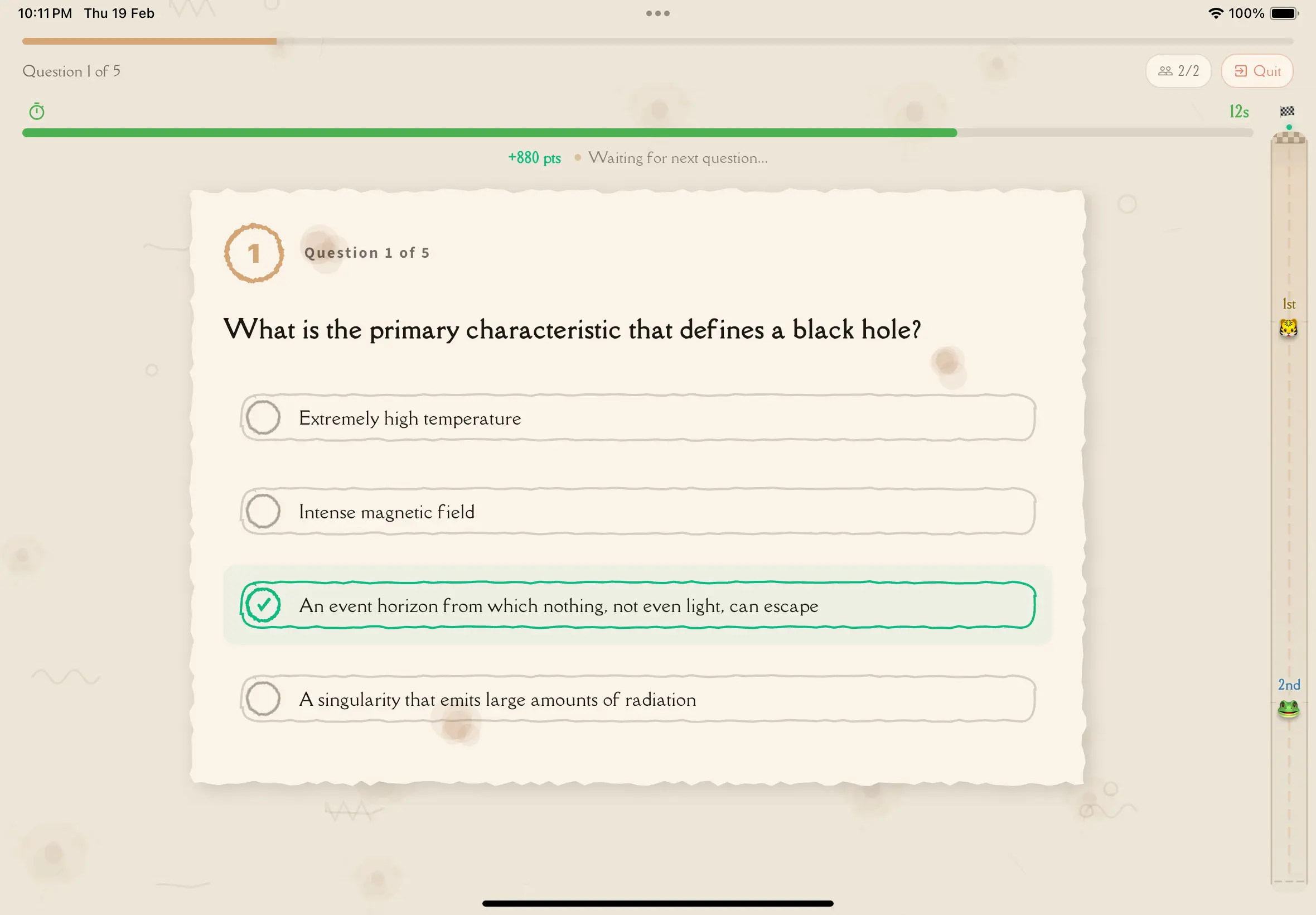
A question appears with four answer options. The timer bar counts down at the top. Everyone selects their answer before time runs out.
Waiting for Results
After you submit your answer, you wait briefly for the timer to expire or for all participants to answer.
Question Result
An overlay shows the correct answer, explanation (if enabled by the host), your score for this question, and the top 5 leaderboard positions with rank change indicators.
Finished
After the final question, everyone is automatically taken to the results page.
The Question Interface
Question Counter
Shows your progress — for example, "Question 3 of 10".
Timer Bar
An animated progress bar at the top of the screen. It changes color as time runs out:
- Green — plenty of time remaining
- Amber — time is getting short
- Red — almost out of time
Question Text
The question is displayed clearly in large text.
Answer Cards
Four vintage torn-paper cards labeled A, B, C, and D. Tap one to submit your answer.
Live Leaderboard
If the host enabled the live leaderboard, a collapsible panel on the side (on tablets) or a compact overlay shows current rankings.
How to Answer
Take a moment to read the full question before looking at the answers.
Read every option before selecting — don't jump at the first answer that looks right.
Tap the answer card (A, B, C, or D) you believe is correct. Your selection highlights and is submitted immediately.
After answering, wait for the timer to expire or for all participants to answer. The result overlay appears next.
Once you tap an answer, it's submitted — you cannot change it. Take a moment to think before tapping.
Scoring
- Correct answers earn base points
- Speed bonus — faster answers score higher. The first person to answer correctly gets the maximum bonus
- Wrong answers earn zero points — there's no penalty for guessing
- No answer (timer expired) earns zero points
Speed matters! Answer quickly for bonus points. But a correct slow answer always beats an incorrect fast one — accuracy comes first.
Question Results
After each question, an overlay shows:
- Correct or incorrect — whether your answer was right
- The correct answer — highlighted in green
- Explanation — if the host enabled Review Questions, a brief explanation appears
- Points earned — your score for this question
- Top 5 leaderboard — updated rankings with rank change indicators (arrows showing who moved up or down)
The overlay stays visible for the configured review time (15, 30, or 60 seconds), then the next question begins.
Host Controls During the Game
The host can:
- End the game early — skip remaining questions and go straight to results
- See all participants' scores — live view of everyone's performance
If the host backgrounds the app during gameplay, the session ends for everyone and all participants are taken to the results page.
If a Participant Leaves
When a participant disconnects or leaves, a brief notification banner appears for everyone else. The banner auto-dismisses after a few seconds. The game continues — remaining participants keep playing.
Troubleshooting
Timer ran out before I answered
If you don't tap an answer before the timer expires, no answer is recorded for that question and you receive zero points. Try to answer faster on the next question — even a guess is better than nothing.
Screen shows "Waiting"
This means you've submitted your answer and the game is waiting for the timer to expire or for all other participants to answer. Just wait — the result overlay will appear shortly.
Lost connection
If you lose connection briefly, the game may continue. Check your session history on the Group Study home screen to rejoin if the session is still active.
Tips for Better Scores
- Read carefully — misreading causes more wrong answers than not knowing
- Don't overthink — your first instinct is often right
- Watch the timer — submit an answer before time runs out, even if you're unsure
- Learn from explanations — if review is enabled, read the explanation after each question to improve on similar future questions
Next Steps
- Results & Leaderboard — what happens after the final question
- The Lobby — review the pre-game experience