Studying Flashcards
Master your material through effective flashcard study sessions with active recall and spaced repetition
Studying flashcards isn't just about flipping through cards—it's about actively engaging your memory to build lasting understanding. Notesmakr's flashcard study interface helps you maximize retention while making study sessions efficient and effective.
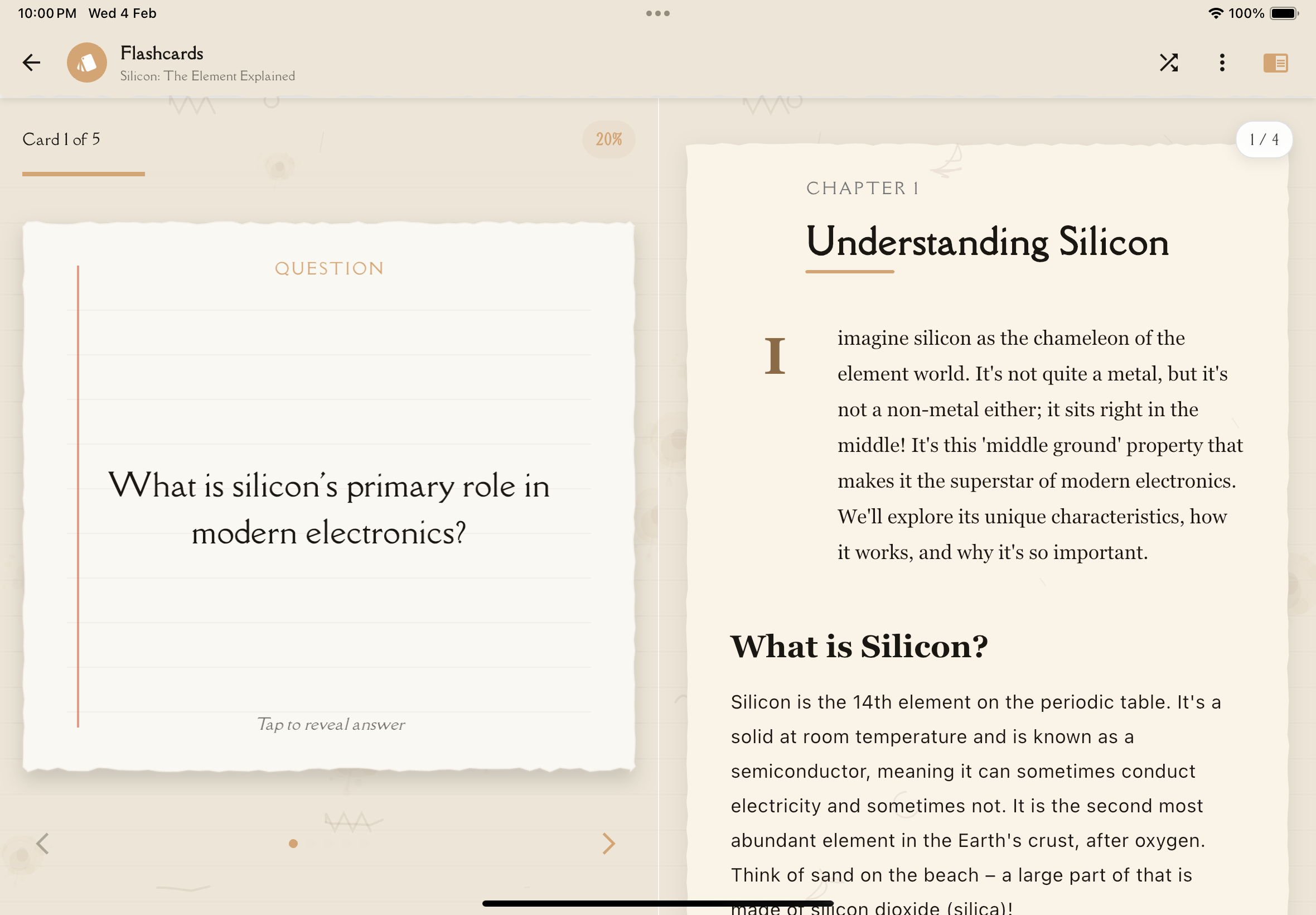
Starting a Study Session
To begin studying a flashcard deck:
From your Flashcard Decks List, tap on the deck you want to study.
Tap the "Study Now" button to begin your session. The first card will appear showing only the front (question) side.
Before flipping the card, actively try to recall the answer. Say it out loud or visualize it in your mind. Don't just immediately flip the card!
Tap the card or the "Show Answer" button to flip it and reveal the back. Compare your recalled answer with the actual answer.
Indicate how well you knew the answer using the response buttons (explained below).
Move to the next card and repeat. Study until you've gone through the entire deck or feel confident with the material.
The Study Interface
Card Display
The flashcard shows the front (question) first, with the back (answer) hidden. The card typically displays:
- The question or prompt in large, readable text
- Card number (e.g., "Card 5 of 24")
- A flip indicator or button
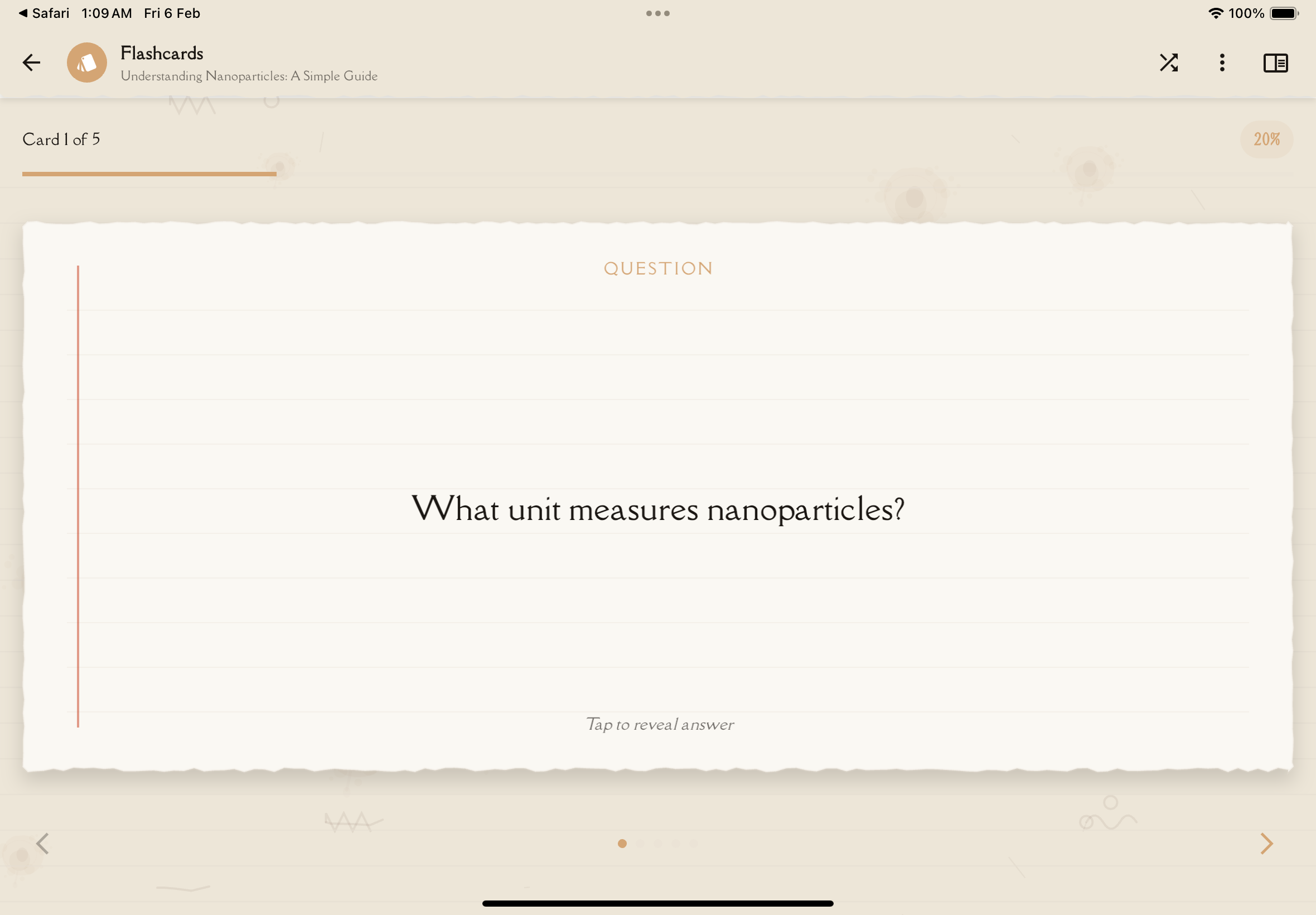
Flipping Cards
Tap anywhere on the card or tap the "Show Answer" button to flip it and reveal the answer on the back.
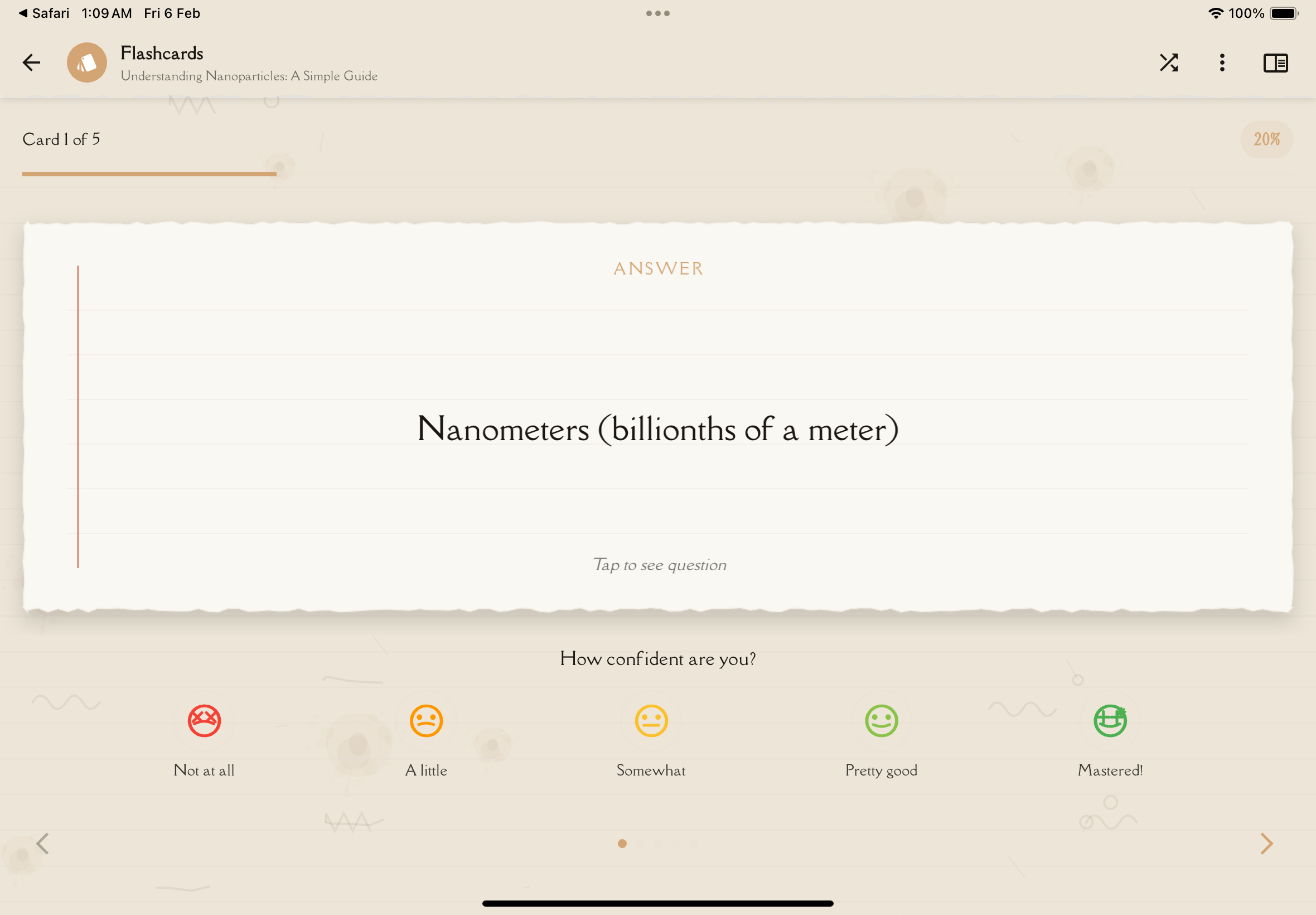
Response Buttons
After viewing the answer, rate your confidence using the 5-level scale:
Not at all (😟) — You don't remember at all. The card resets to frequent review.
A little (😕) — You barely recalled it. The card resets to frequent review.
Somewhat (😐) — You partially recalled the answer. The review interval advances slowly.
Pretty good (😊) — You recalled it with some thought. The interval advances normally.
Mastered (😎) — Instant recall. The interval advances significantly.
Your confidence rating determines when you'll see the card again based on spaced repetition scheduling.
Be honest with yourself! Rating cards higher than you deserve won't help you learn—you'll just see them less often and forget them. It's okay to struggle—that's how memory strengthens.
Study Modes
Notesmakr offers flexible options for studying your flashcards:
All Cards vs. Due Only
Toggle between studying all cards in a deck or only cards that are due for review based on spaced repetition scheduling. A badge shows how many cards are currently due, so you can focus your study time where it matters most.
Shuffle Toggle
Tap the shuffle icon in the toolbar to randomize card order during your study session.
How Shuffle Works:
- Randomizes card order for the current study session
- Prevents pattern memorization
- Tests true recall instead of position memory
- More challenging and effective for learning
When to Use Shuffle:
- Most decks — Tests true understanding without sequence cues
- Exam preparation — Simulates random question order on tests
- Breaking patterns — If you notice memorizing card positions
When NOT to Use Shuffle:
- Step-by-step processes — Sequential procedures or workflows
- Chronological information — Historical events or timelines
- Ordered lists — When order matters (e.g., steps in a recipe)
Toggle Off: Return to spaced repetition order, where due cards appear first based on your review schedule.
Use shuffle for most decks to test true recall. Only use sequential order for step-by-step processes or chronological information where order is part of what you need to learn.
Built-in Spaced Repetition
Spaced repetition is always active — it's not a separate mode. Every card's review schedule adjusts automatically based on your confidence ratings. Cards you struggle with appear more frequently, while mastered cards appear less often.
Spaced repetition is the most scientifically-proven method for long-term retention. Review cards at increasing intervals: 1 day, 3 days, 1 week, 2 weeks, 1 month.
Progress Tracking
During your study session, Notesmakr tracks:
Cards Reviewed
The number of cards you've studied in this session (e.g., "12 / 24 studied")
Mastery Progress
How many cards you've marked "Got It" vs. "Didn't Know"—shown as a progress bar or percentage
Session Time
How long you've been studying (helps you pace yourself and stay focused)
Study Streaks
Notesmakr tracks your daily study streak across all decks to keep you motivated and consistent.
Effective Study Techniques
Active Recall
Don't just flip cards immediately. Take a moment to actively try remembering the answer before revealing it. This retrieval process is what strengthens memory.
Say It Out Loud
Verbalizing your answer (or writing it down) engages more of your brain and improves retention compared to just thinking it.
Understand, Don't Memorize
If you don't know a card, don't just read the answer and move on. Take a moment to understand why it's the answer. Return to your full study note if needed.
Use Mnemonics
Create memory aids for difficult cards. Association, visualization, and silly stories make information stick.
Study Regularly
Short, frequent sessions (15-20 minutes daily) are more effective than long, infrequent cram sessions. Notesmakr's "Last Studied" indicator helps you maintain consistency.
The best time to review is right before you're about to forget. That's why spaced repetition works—you strengthen memories just as they're fading, which makes them stronger than before.
Session Controls
During a study session, you have several control options:
Navigation
Use the previous and next arrows at the bottom to move between cards. Dot indicators show your current position in the deck.
Exit Session
Tap the back button to leave the session. A confirmation dialog ("Quit studying?") will appear to prevent accidental exits. Your progress is saved automatically.
More Options
Tap the menu icon (⋮) for additional options:
- Print — Print all flashcards with customizable layout options
- Delete — Remove the entire flashcard deck
After Your Study Session
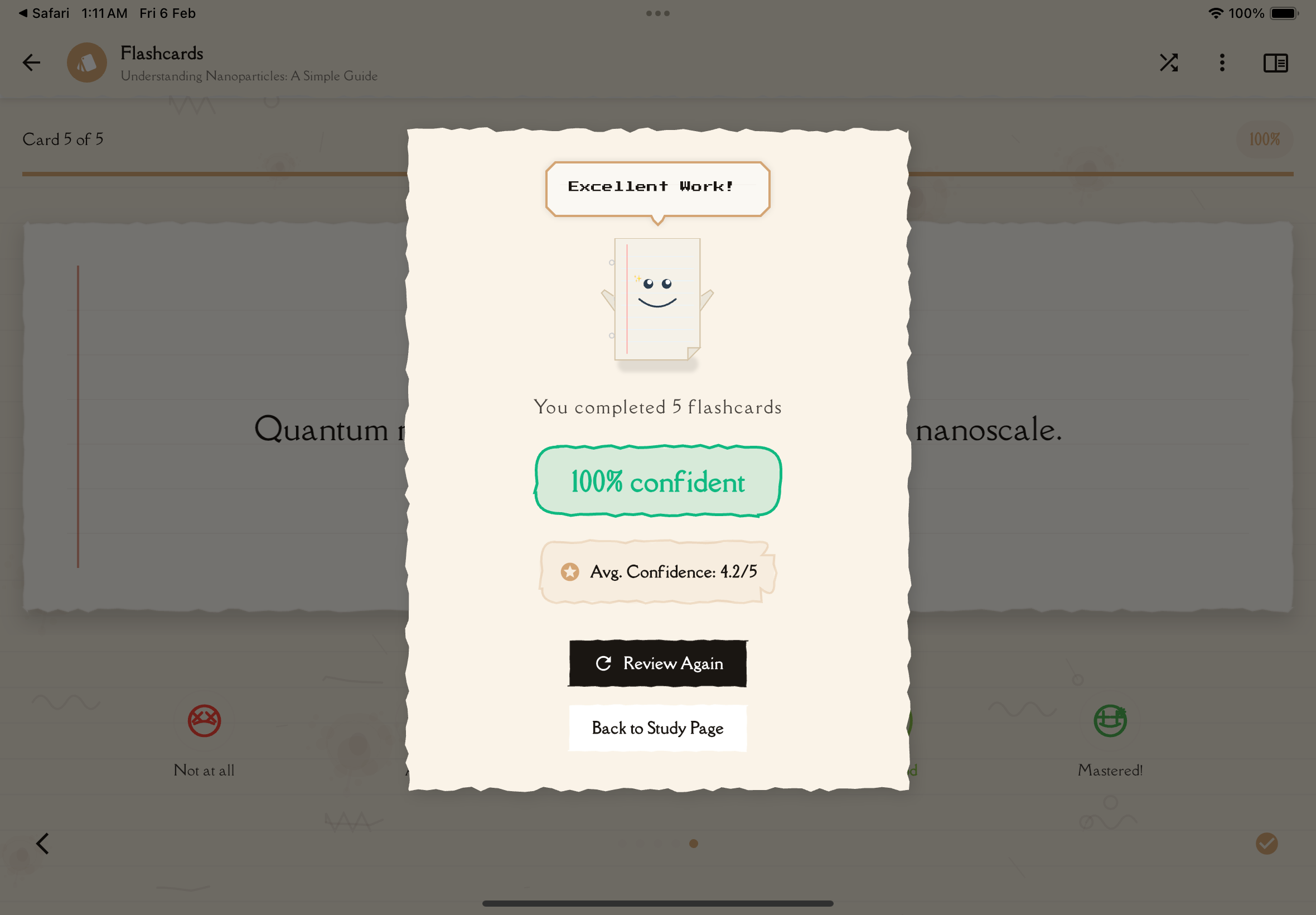
When you complete a deck, a completion screen shows your performance:
Session Summary
- Cards studied — Total number of cards you reviewed
- Mastery percentage — Shown as a badge with your overall score
- Average confidence — Your mean confidence rating across all cards
- Performance level — "Excellent" (4.0+), "Good" (3.0+), or "Keep practicing"
What's Next
From the completion screen, you can:
- Review Again — Restart the study session immediately
- Back to Study — Return to your study note
Spaced repetition scheduling updates automatically for each card based on your confidence ratings — cards you struggled with will appear sooner in your next session.
If your average confidence is low, that's a signal to revisit your study note. You might need to deepen your understanding before flashcard practice will be effective.
Study Tips for Maximum Retention
1. Start Fresh
Study when you're alert, not exhausted. Morning study sessions often work best.
2. Eliminate Distractions
Put your phone in focus mode, close other apps, and study in a quiet space.
3. Mix It Up
Don't just study one deck repeatedly. Alternate between different subjects to keep your brain engaged and improve retention through interleaving.
4. Take Breaks
After 20-30 minutes, take a 5-minute break. This helps consolidate memories and prevents burnout.
5. Test Yourself Before Tests
Use flashcards for final review before exams, but don't rely on them exclusively. Make sure you understand concepts deeply, not just surface-level facts.
Flashcards are a tool for reinforcement, not initial learning. Use them after you've already studied and understood the material in your study notes.
Common Mistakes to Avoid
Flipping Too Quickly
Give yourself time to actually recall before checking the answer. The struggle is what builds memory.
Being Too Generous
Don't rate cards as "Mastered" or "Pretty good" if you hesitated or only partially remembered. Honest self-assessment leads to better learning.
Studying Passively
Don't just read cards—actively engage. Close your eyes, visualize concepts, explain them out loud.
Ignoring Context
If you don't understand why an answer is correct, you're just memorizing words. Always seek understanding.
Only Studying Once
One study session isn't enough. Review cards multiple times over days and weeks for long-term retention.
Next Steps
Now that you know how to study effectively with flashcards, explore other study tools in Notesmakr:
- Generate more flashcard decks from your study notes
- Try Quizzes for multiple-choice practice
- Use Mind Maps for visual learning