Create from Custom Text
Turn any text content into structured study notes with AI-powered organization and enhancement
Text notes are the quickest and most flexible way to create study materials. Type directly or paste from articles — Notesmakr's AI organizes and structures everything into comprehensive study notes.
When to Use Text Notes
Text notes are perfect for:
- Web articles: Copy educational articles and blog posts
- Textbook excerpts: Type or paste key passages
- Personal notes: Capture your own understanding of topics
- Study guides: Transform existing study materials
- Class notes: Type up handwritten notes for organization
- Research summaries: Consolidate multiple sources
- Quick captures: Jot down ideas or concepts to expand later
- Definitions and formulas: Create reference notes
Text notes are the fastest to process — often ready in 10-30 seconds! Perfect for quick study sessions or when you need notes immediately.
Step-by-Step Guide
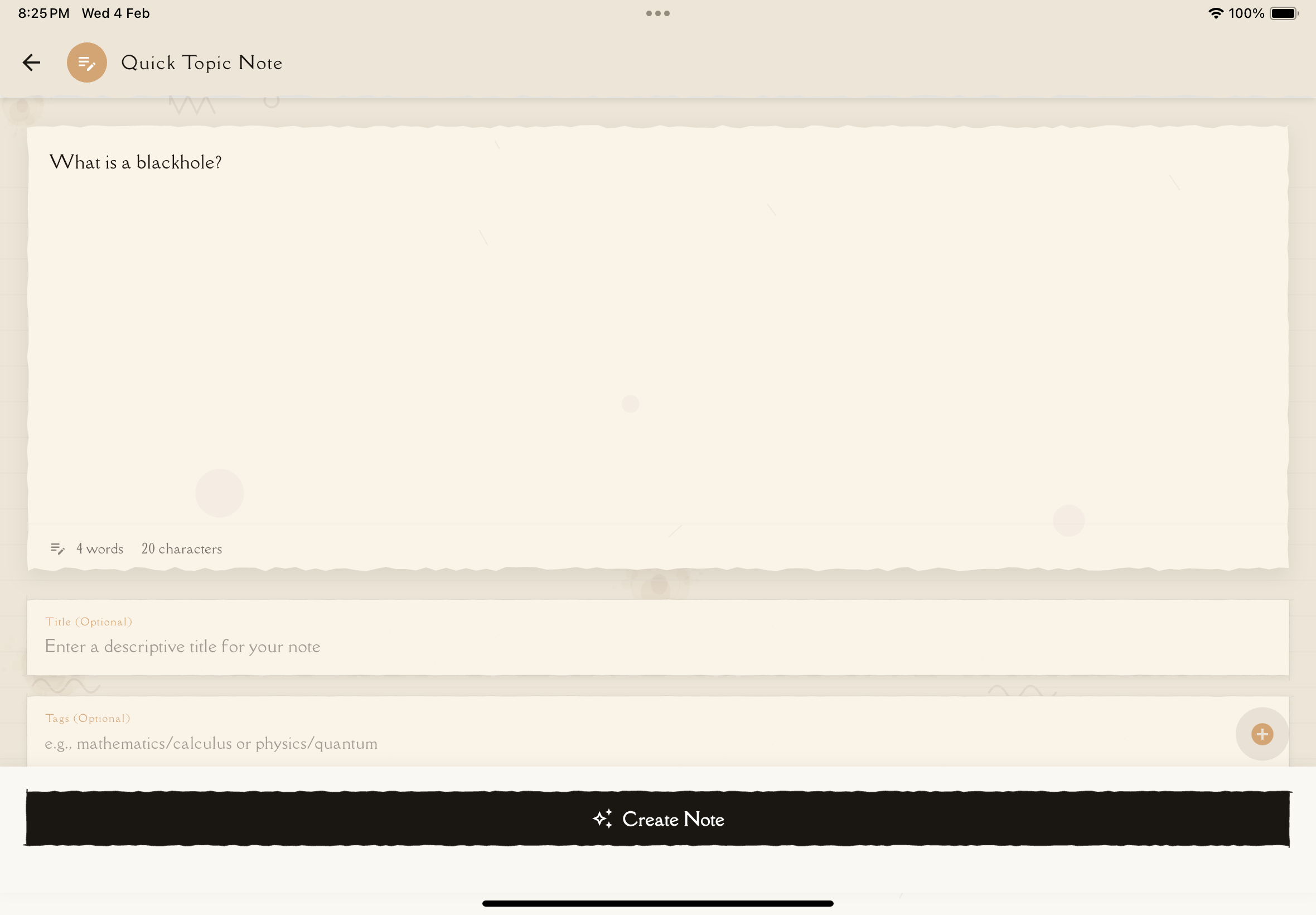
From the Notes tab, tap the New Note button.
Tap Text from the creation options (represented by a pencil/edit icon).
You have two options:
Type directly:
- Write in the text editor
- Great for personal notes or typing up handwritten content
Paste text:
- Copy text from elsewhere (websites, documents, messages)
- Tap the text field and select Paste
No minimum length, but more content = more comprehensive notes.
Recommended length: 500-5,000 words for best results.
Give your note a descriptive title.
Title examples:
- "Photosynthesis Overview - Light and Dark Reactions"
- "Python Decorators Explained"
Add relevant tags for organization:
- Subject (e.g., "Biology", "Programming")
- Topic (e.g., "Exam Prep", "Tutorial")
Tap Create Note. AI processes your text.
What happens:
- Analyzes text structure and content
- Identifies key concepts and definitions
- Organizes into logical sections
- Adds clarifications and structure
- Prepares content for flashcard and quiz generation
Typical processing time: 10-60 seconds (depending on length)
Once complete, open your note to find:
- Summary: High-level overview
- Key Concepts: Main ideas organized clearly
- Structured Content: Your text improved and organized
You can then generate flashcards, quizzes, and mind maps from the note.
What AI Does with Your Text
Notesmakr's AI enhances your text in several ways:
Organization
- Logical structure: Creates sections and subsections
- Clear headings: Adds descriptive titles
- Hierarchical flow: Orders content from general to specific
Clarification
- Simplification: Breaks down complex sentences
- Definitions: Explains terminology
- Examples: Adds concrete examples where helpful
Enhancement
- Context: Adds background information
- Connections: Links related concepts
- Applications: Shows real-world uses
Text Length Guidelines
Minimum
- No enforced minimum, but very short text (under 100 words) may not generate enough study material
- AI works best with at least a few paragraphs
Optimal Range
- 500-5,000 words: Best balance of depth and processing speed
- Creates comprehensive notes with good study materials
Maximum
- Very long text takes longer to process
- Consider splitting into multiple notes for better organization
For long documents, create separate notes for each major topic or chapter. This makes studying more manageable and keeps notes focused.
Common Use Cases
Copying Web Articles
On the webpage, select all the main content (exclude ads, navigation, comments).
Right-click then Copy (or Ctrl+C / Cmd+C)
Open text note creation and paste (Ctrl+V / Cmd+V)
Remove any unwanted elements (ads, "Read more" links, etc.)
Add title, tags, and create the note!
Typing Personal Notes
Perfect for capturing your own understanding:
Type your thoughts, explanations, and insights naturally. Don't worry about perfect formatting.
Add examples that make sense to you — AI will enhance them.
Basic structure helps: main topics as headings, details as paragraphs.
AI will improve structure and clarity of your notes.
Formatting Tips
Use Clear Headings
# Main Topic ## Subtopic 1 ### Detail A ### Detail B ## Subtopic 2
Helps AI understand structure and organize content logically.
Emphasize Key Terms
Use bold for important terms — AI recognizes these as important and creates study materials around them.
Structure Lists
Use bullet points or numbers:
Light reactions require:
- Water
- Light energy
- Chlorophyll
Clear lists are easier for AI to parse and enhance.
Separate Sections
Use blank lines between sections to help AI identify where topics change.
Troubleshooting
"Processing failed" or "Error"
Possible causes:
- Network connectivity issues
- Server temporarily unavailable
- Special characters causing parsing errors
Solutions:
- Check internet connection
- Try again in a few moments
- Remove unusual special characters or symbols
- Copy-paste into a plain text editor first, then copy from there
Missing key information
Cause: Text was ambiguous or AI missed context
Solution:
- Manually edit the note to add missing info
- Include more context in the original text
AI added incorrect information
Cause: AI may have made assumptions or hallucinated details
Solution:
- Always review notes for accuracy
- Edit and correct any errors
AI can occasionally add plausible-sounding but incorrect information, especially with technical or specialized subjects. Always review critical details!
Tips for Best Results
Pro tips for creating great text notes:
- Clear structure: Use headings and paragraphs — makes AI's job easier
- Be specific: Include examples, definitions, and context
- Emphasize key terms: Use bold or headings for important concepts
- Write naturally: Don't worry about perfect prose — AI enhances clarity
- Include formulas: Type equations (AI recognizes them)
- Add your insights: Mix source material with your own understanding
- Descriptive titles: Name notes clearly for easy finding later
- Tag immediately: Organize as you create
- Use bullet points: Lists are easy to read and study from
- Review and refine: Skim the AI output and add anything missing
What's Next?
Your text note is ready — time to study!
Or create notes from other sources: