Studying Notes
Master the Feynman Technique with Notesmakr's comprehensive study interface
Once you've created a note, it's time to study! Notesmakr's study interface is designed around the Feynman Technique—a proven method for deep understanding. Instead of passively reading, you'll engage actively with the material through reading, testing, and reviewing.
The Feynman Technique in Notesmakr
Named after Nobel Prize-winning physicist Richard Feynman, this learning method is based on the principle: you truly understand something only when you can explain it simply.
Notesmakr guides you through the four steps:
1. Learn (Overview + Reading)
Read through the simplified explanations AI created from your source material. The content is already broken down into clear, digestible concepts.
2. Test Yourself (Study Tools)
Use flashcards and quizzes to identify what you know and what you don't. Finding gaps is the key to improvement!
3. Fill the Gaps (Q&A + Mind Map)
When you discover gaps, use the Q&A chat to ask questions and explore the mind map to see how concepts connect.
4. Simplify Further (Annotations)
Add your own explanations and insights directly in the Reading tab using annotations. If you can explain it in your own words, you've mastered it.
The Study Interface: Three Tabs
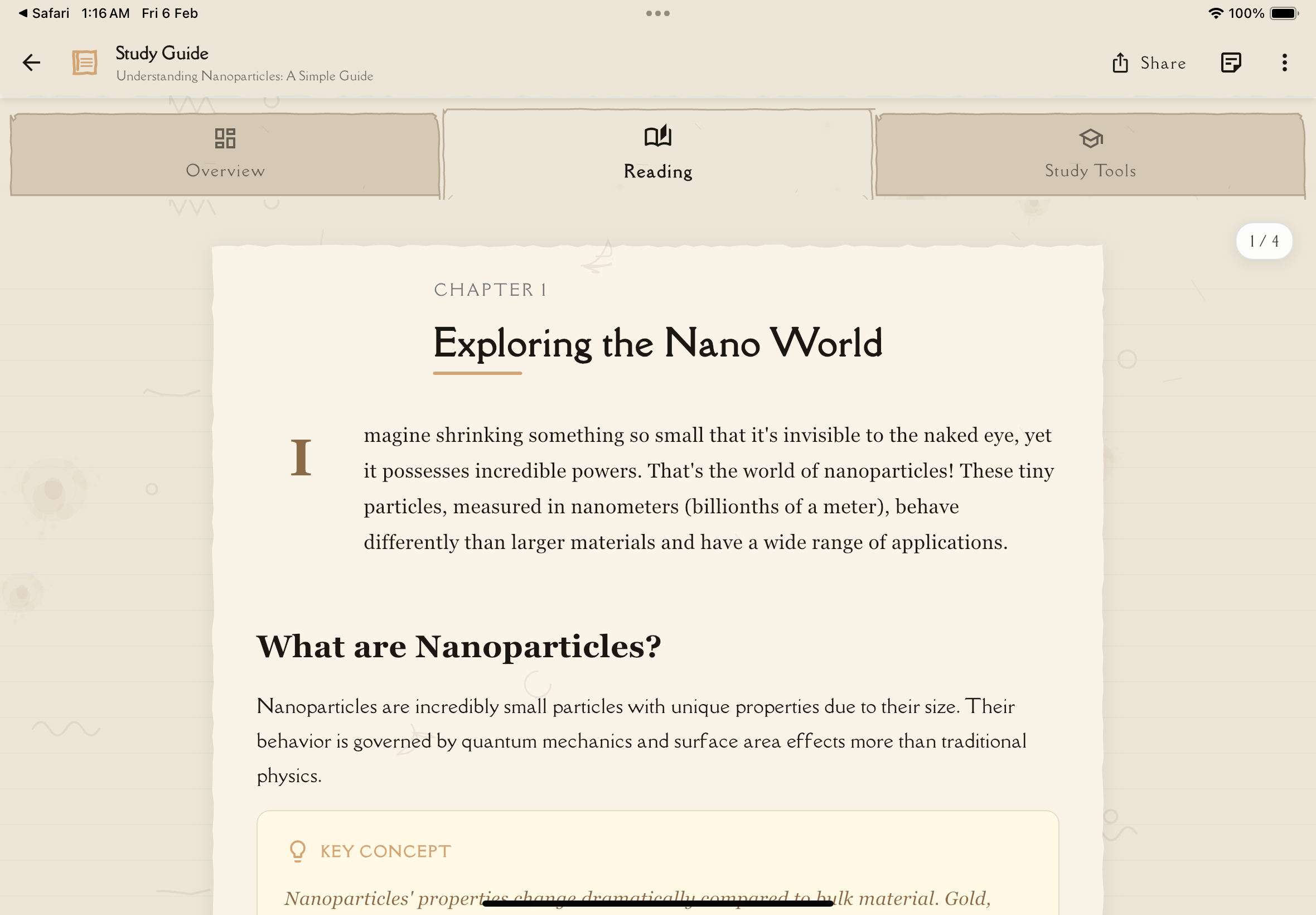
When you tap a note from the Notes tab, you enter the study interface with three main sections:
Overview Tab
Your note's summary, key concepts, and metadata.
What you'll find:
- Quick summary of the entire note
- Key concepts list
- Tags and categories
- Creation date and source
- Progress indicators
- Quick actions (share, export, edit)
Learn more about the Overview tab →
Reading Tab
Full content of your note, organized for easy reading.
What you'll find:
- Complete, paginated content
- Swipe navigation between pages
- Highlights and annotations
- Progress tracking (pages read)
Learn more about the Reading tab →
Study Tools Tab
Interactive tools to test and deepen your understanding.
What you'll find:
- Flashcards: Active recall practice
- Quizzes: Test your knowledge
- Q&A Session: Ask AI questions about the content
- Mind Map: Visual concept relationships
Annotations are part of the Reading tab! Add typed, handwritten, or voice annotations directly alongside your study content.
Learn more about the Study Tools tab →
Follow this study flow: Overview → Reading (add annotations) → Flashcards → Quiz → Q&A (for gaps) → Reading (add more annotations to solidify). This mirrors the Feynman Technique perfectly!
Study Tools Explained
Flashcards
Purpose: Active recall—the most effective memorization technique.
How it works:
- AI generates question-answer pairs from your note
- You see the question, try to recall the answer
- Flip the card to check
- Rate your confidence on a 1-5 scale (Not at all, A little, Somewhat, Good, Mastered)
- Spaced repetition uses your ratings to schedule future reviews
Best for: Definitions, facts, formulas, terminology
Quizzes
Purpose: Comprehensive testing of understanding.
How it works:
- AI generates single-choice questions from your note content
- You answer all questions in one session
- Get immediate feedback and explanations
- Review mistakes to learn from them
- Track scores over time
Best for: Exam preparation, comprehensive review, finding knowledge gaps
Mind Map
Purpose: Visual understanding of concept relationships.
How it works:
- AI creates a visual map of concepts from your note
- Central topic branches into subtopics
- Subtopics connect to related ideas
- Zoom, pan, and tap nodes to explore
- See the "big picture" of the subject
Best for: Understanding structure, seeing connections, visual learners
Q&A Session
Purpose: Fill knowledge gaps with interactive questions.
How it works:
- Chat interface powered by AI
- Ask any question about your note
- Get detailed, context-aware answers
- Ask follow-up questions
- Entire conversation is saved with the note
Best for: Clarifying confusion, exploring deeper, exam prep questions
Annotations
Purpose: Explain concepts in your own words directly in the Reading tab (Feynman Technique step 4).
How it works:
- Add annotations from the Reading tab by selecting text or using the floating action button
- Write typed annotations with your own explanations and examples
- Draw diagrams using the handwriting canvas
- Record voice annotations explaining concepts
- Link annotations to specific text passages
Best for: Solidifying understanding, adding personal insights, creating custom summaries
Study Strategies
First-Time Study
When you first open a new note:
Read the summary and key concepts to get the big picture (2-3 minutes).
Go through the full content in the Reading tab. Don't worry about memorizing—just understand (10-30 minutes).
Test what stuck from your first read. Don't worry about getting things wrong—this identifies gaps (5-10 minutes).
Go back to the Reading tab and review concepts you struggled with in flashcards (5-15 minutes).
Test your comprehensive understanding. Review wrong answers carefully (10-20 minutes).
In the Reading tab, add annotations explaining tricky concepts in your own words (5-10 minutes).
Total time: 40-90 minutes for thorough initial study
Spaced Review
After the initial study, return to the note periodically:
Day 1 (initial study): Full process above Day 2: Flashcards + quiz (20 min) Day 4: Flashcards (10 min) Day 7: Flashcards + quiz (25 min) Day 14: Flashcards (10 min) Day 30: Full review if needed (30 min)
This spaced repetition pattern maximizes long-term retention.
Spaced repetition works better than cramming! Reviewing content at increasing intervals dramatically improves retention with less total study time.
Exam Preparation
When studying for an exam:
Identify notes covering exam topics.
Test yourself on everything. Note weak areas.
Use Q&A to clarify concepts you struggled with.
Use mind maps to see how topics relate.
Use annotations in the Reading tab to explain everything as if teaching someone else. Can you explain it simply?
Review all flashcards one last time before the exam.
Quick Review
Short on time? Do a 10-minute review:
- Skim Overview (2 min): Refresh memory on key concepts
- Flashcards (5 min): Active recall on main points
- Reading Tab (3 min): Review your annotations
Progress Tracking
Notesmakr tracks your study progress automatically:
Per-Note Metrics
- Pages read: Percentage of content you've viewed
- Flashcard mastery: Percentage of cards you've mastered
- Quiz scores: Average score across all quiz attempts
- Overall progress: Combined metric of all activities
Streaks & Motivation
- Daily streak: Consecutive days studied, with milestone celebrations at 3, 7, 14, 30, 60, 90, 180, and 365 days
- Longest streak: Your all-time best streak record
Individual note pages show per-note progress indicators.
Keep your daily streak going! Consistency beats intensity when it comes to long-term retention.
Study Settings
Customize your study experience:
Flashcard Settings:
- Number of flashcards to generate (5-20 per note)
- Difficulty level (Easy, Medium, Hard)
Quiz Settings:
- Number of questions to generate
- Difficulty level (Easy, Medium, Hard)
Annotation Settings:
- Configure how highlights and annotations behave
Access settings: Settings → Study Settings
Offline Study
All study tools work offline once notes are downloaded:
Available offline:
- Reading notes
- Reviewing flashcards
- Taking quizzes (already generated)
- Viewing mind maps
- Adding personal notes (typed)
Requires internet:
- Generating new quizzes
- Q&A sessions (AI chat)
- Syncing progress across devices
Progress is saved locally and syncs when you reconnect.
Tips for Effective Study
Study best practices:
- Spaced repetition over cramming: Study regularly, not just before exams
- Active recall: Test yourself (flashcards/quizzes) rather than just re-reading
- Explain to learn: Use personal notes to write explanations in your own words
- Find gaps: Pay attention to what you get wrong—that's where learning happens
- Visual connections: Use mind maps to understand relationships
- Ask questions: Use Q&A to clarify confusion immediately
- Mix it up: Combine reading, flashcards, quizzes, and discussion
- Short sessions: Multiple 20-minute sessions beat one 2-hour marathon
- Teach others: Share notes and explain concepts to study partners
- Review mistakes: Every wrong answer is a learning opportunity
What's Next?
Dive deeper into each study component:
Or explore other features:
Happy studying!