
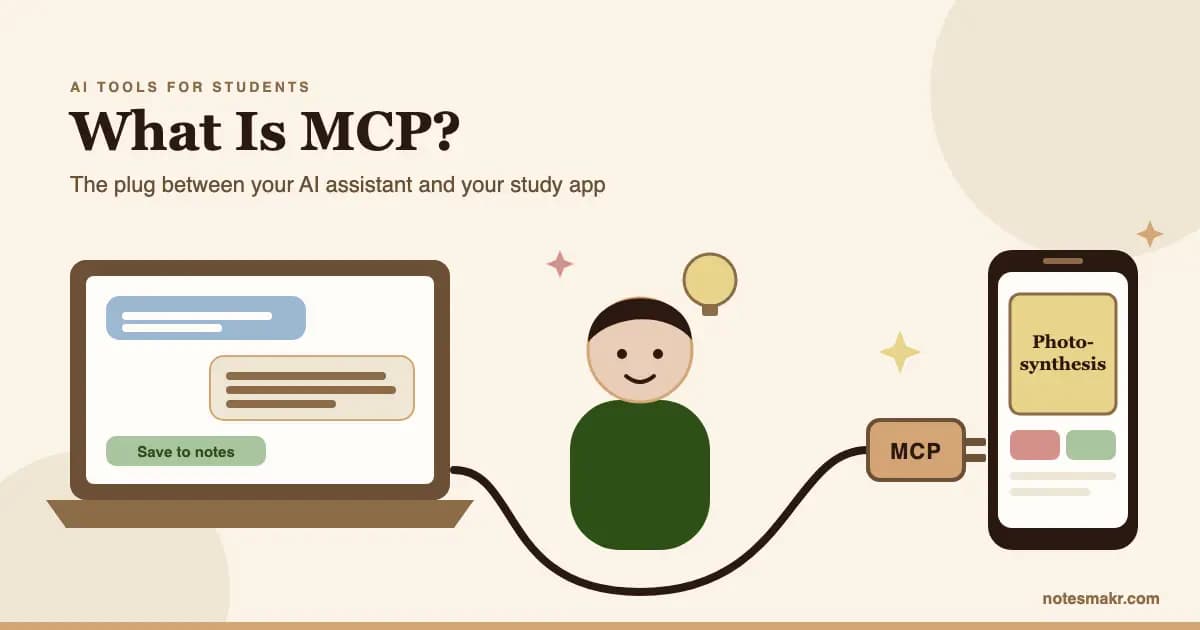
What is MCP? MCP, short for Model Context Protocol, is an open standard that lets an AI assistant such as Claude use other apps: read a file, search a database, or save something into the app you study in. Think of it as a plug. The assistant is the device, the app is the socket, and MCP is the shape of the plug that fits both.
Here's the uncomfortable truth about studying with AI: the chat answer you loved last night is gone. You closed the tab. Maybe you copied a paragraph into a notes file you will never open again. The explanation was good, but nothing turned it into memory.
MCP fixes the "where does it go" part. It lets the assistant put its work straight into the place where you review it. This guide explains MCP without jargon, shows what an MCP server is, answers "is it safe?", and walks you through a real three-step setup you can finish in about five minutes.
What Is MCP in AI?
A large language model on its own can only do one thing: read text and write text back. It can't open your calendar, check a spreadsheet or save a flashcard. To do any of that, it needs a connection to another program.
Before MCP, every one of those connections was custom. Anthropic, the company behind Claude, put the problem plainly when it launched MCP in November 2024: "Every new data source requires its own custom implementation, making truly connected systems difficult to scale" (Anthropic, 2024).
MCP replaced all those one-off connections with one shared language. The official documentation uses an analogy you already know:
"Think of MCP like a USB-C port for AI applications." One standard shape, so any assistant that speaks MCP can plug into any app that offers an MCP server. (modelcontextprotocol.io)
It caught on fast. By December 2025, Anthropic reported more than 10,000 active public MCP servers and adoption by ChatGPT, Cursor, Gemini, Microsoft Copilot and Visual Studio Code. That month it handed MCP to the Agentic AI Foundation, a fund under the Linux Foundation co-founded by Anthropic, Block and OpenAI, so no single company owns the standard (Anthropic, 2025).
So when someone asks "what is MCP in AI?", the short answer is: the agreed way for an AI assistant to use tools.
What Is an MCP Server?
An MCP server is the part an app builds so assistants can use it. It's a menu of actions the app offers, written in a way any MCP-speaking assistant understands. The assistant on your side is called the MCP client.
Every conversation between them follows the same two moves:
- "What can you do?" The assistant asks the server for its list of tools.
- "Do this one." The assistant picks a tool and sends the details.
That's it. There's no magic memory and no hidden access. The assistant can only do what the server's menu allows.
Here's what that menu looks like for a study app. The Notesmakr MCP server's main tools are: create a note, add flashcards to it, add a quiz, add a mind map, and create a standalone flashcard deck. There is no "read my notes" tool and no "delete" tool. An assistant connected to it can add study material, and nothing else.
Why MCP Matters for Studying
A chat window is a great explainer and a terrible filing cabinet. Understanding something once is not the same as remembering it in three weeks.
The forgetting problem
Hermann Ebbinghaus showed in 1885 that newly learned material fades fast when you never revisit it. Modern research agrees on the cure. In Roediger and Karpicke's 2006 experiments, students who tested themselves on a passage remembered far more a week later than students who reread it, even though the rereaders felt more confident. And Cepeda and colleagues' 2006 review of hundreds of studies found that spreading reviews out over time beats cramming them together.
Put those together and you get the study loop that works:
| Step | What happens | Where it usually breaks |
|---|---|---|
| Understand | Get a clear explanation | Rarely. AI is good at this. |
| Capture | Save the key ideas somewhere you'll see again | Here. The answer stays in the chat. |
| Retrieve | Test yourself with flashcards or a quiz | Never starts, because nothing was captured |
| Space | Review again over days and weeks | Never starts either |
Based on Roediger & Karpicke (2006) and Cepeda et al. (2006).
MCP repairs the capture step. Instead of copying and pasting, you ask the assistant to save the explanation, the flashcards and a quiz into your study app in one go. The retrieval and spacing then happen in the app built for them.
If you've read our guide on how to use ChatGPT for studying, this is the same split: let the AI explain and question you, and let a review system handle the remembering.
Is MCP Safe? Tokens Explained
This is the question to ask before you connect anything. MCP itself is just a language. Safety depends on what each server lets the assistant do and how you prove who you are.
Most study-app connections use a personal access token: a long random password made for one purpose. You create it in the app, paste it into your assistant's settings, and the server uses it to know the requests are yours.
Three questions tell you whether a connection is safe:
- What can the token do? A token that can only add things is far lower risk than one that can read or delete.
- Can you revoke it? You should be able to switch it off in one tap if you lose a laptop or stop using an assistant.
- Who writes the content? If the assistant writes the notes, check them like you'd check any AI output.
Notesmakr's tokens answer all three clearly. They are write-only: an assistant can add notes, flashcards, quizzes and mind maps, but it cannot read, change or delete anything already in your library. You can revoke a token in the app at any time. And the assistant writes the content, so Notesmakr runs no AI of its own on this path.
Claude Connectors vs MCP
If you use Claude, you've probably seen the word "connectors". They're not a rival to MCP. They're built on it.
A Claude connector is an MCP server that you switch on inside Claude's own apps (claude.ai and Claude Desktop) by adding a URL and signing in. Anthropic's help pages call these "custom connectors using remote MCP", and they're available on the Free plan (one custom connector) as well as paid plans (Claude Help Center).
The other route is to add an MCP server yourself in a tool's config, usually with a token. That's how Claude Code, Cursor and VS Code work.
| Claude connector | MCP server added by config | |
|---|---|---|
| Where | claude.ai, Claude apps | Claude Code, Cursor, VS Code, Claude Desktop config file |
| Setup | Paste a URL, sign in | One command or a few lines of config |
| How you prove it's you | Sign-in (OAuth) | Usually a personal token |
| Same protocol underneath? | Yes: MCP | Yes: MCP |
For Notesmakr today, the token route is the one that works. A one-click connector for claude.ai, the Claude phone apps and ChatGPT is planned but not available yet, so use one of the assistants in the next section.
How to Use an MCP Server: 3-Step Setup
Here's the whole thing, using Notesmakr as the worked example. Notesmakr is an AI notes maker built around the Feynman Technique: it turns study material into plain-language notes with flashcards, quizzes and mind maps you review on your phone.
The setup works with Claude Code, Cursor, VS Code (Copilot), Claude Desktop and other MCP clients that can send a token in a header. Full guides for each are on the Notesmakr MCP page.
Open the Notesmakr app, go to Settings → Connect AI assistants and tap Create token. Copy it straight away: it's shown only once.
In Claude Code, it's a single terminal command (swap in your own token):
claude mcp add --scope user --transport http notesmakr https://notesmakr.com/api/mcp --header "Authorization: Bearer YOUR_NOTESMAKR_TOKEN"
Using a different assistant? Follow the Cursor setup guide (a short JSON entry) or the Claude Desktop setup guide (a config file entry; it needs Node.js installed). The Claude Code guide has the command above with a check step.
Start your assistant and type something like: "Make a Notesmakr note on photosynthesis with 10 flashcards, a quiz and a mind map." The note appears in your Notesmakr library, with everything attached, ready to review.
What it costs
Be clear-eyed about this. Each note the assistant saves uses one note from your Notesmakr plan, the same as a note made in the app (the free plan includes 5). Attaching flashcards, a quiz and a mind map to that note is free, and so is saving a standalone flashcard deck with no note. Your assistant writes the cards, so the assistant itself may be a paid product depending on which one you use. Reviewing everything afterwards with spaced repetition is free.
Watch: MCP Explained in Plain Terms
Two short videos if you'd rather see it than read it.
What is MCP? Integrate AI Agents with Databases and APIs (IBM Technology)
IBM Technology walks through how an AI agent, an MCP client and MCP servers fit together, from a developer's angle. The takeaway for you: the assistant can only call the tools a server chooses to expose.
Model Context Protocol (MCP), clearly explained (Greg Isenberg)
A plain-language conversation about why MCP matters, with no code required to follow it. The takeaway for you: MCP connects tools you already use; it is not another app to learn.
A Practical Example: One Topic, Two Ways
Here's the same study session done without and with an MCP connection. The topic is the light-dependent reactions in photosynthesis.
You ask the assistant to explain the light-dependent reactions. It gives a clear, friendly answer. You nod along, think "got it", and close the tab.
Three weeks later, a mock paper asks where the oxygen comes from. You remember reading something about water. You can't produce the answer. There were no flashcards, no quiz, nothing to come back to.
You ask for the same explanation, then say: "Save this as a Notesmakr note with 10 flashcards and a 5-question quiz." The note lands in your library in seconds.
That evening you do the quiz on your phone and miss one question about photolysis. The flashcards then come back over the next days and weeks on a spaced-repetition schedule. On the mock paper, "oxygen comes from splitting water" is just there.
The explanation was identical both times. The difference is that the second version captured it and made you retrieve it. That's the part that builds memory, and it's the part chat alone skips. Turning explanations into questions is the heart of active recall, and asking for a plain-language note first follows the Feynman Technique.
Quick Reference: MCP Terms for Students
| Term | Plain meaning |
|---|---|
| MCP | The shared language that lets an AI assistant use other apps |
| MCP client | The assistant side: Claude Code, Cursor, Claude Desktop, VS Code |
| MCP server | The app side: a menu of actions the assistant may call |
| Tool | One action on that menu, like "create a note" |
| Token | A personal password that proves requests come from you |
| Write-only token | A token that can add things but never read or delete |
| Connector | Claude's name for an MCP server you switch on inside its apps |
Common Mistakes (And How to Avoid Them)
Mistake 1: Thinking MCP lets the assistant see everything
MCP only gives access to the tools a server offers. Many study-app servers, Notesmakr's included, can't read your existing notes at all.
The fix: Check the server's tool list or setup page before connecting, and prefer write-only access when it's offered.
Mistake 2: Saving the explanation but skipping retrieval
A note you never test yourself on is just a tidier chat log.
The fix: Always ask for flashcards or a quiz alongside the note, then actually review them. Our spaced repetition guide explains how the review timing works.
Mistake 3: Trusting AI-written cards without checking them
Your assistant writes the content, and assistants make mistakes.
The fix: Skim every new note and deck once. Fix or delete any card that's wrong or vague before you start reviewing. For more on writing cards that work, see the AI flashcards guide.
Mistake 4: Pasting your token somewhere public
A token in a screenshot or shared doc is a password anyone can use.
The fix: Keep it in your assistant's config only. If it leaks, revoke it in the app and make a new one.
The Research Behind It
- Testing effect (Roediger, H. L. & Karpicke, J. D., 2006): "Test-Enhanced Learning." Psychological Science, 17(3). Self-testing produced better recall a week later than rereading.
- Spacing effect (Cepeda, N. J. et al., 2006): "Distributed Practice in Verbal Recall Tasks." Psychological Bulletin, 132(3). Reviews spread over time beat massed study across hundreds of experiments.
- Effective learning techniques (Dunlosky, J. et al., 2013): "Improving Students' Learning With Effective Learning Techniques." Psychological Science in the Public Interest, 14(1). Practice testing and distributed practice rated highest utility; rereading and highlighting rated low.
- Generation effect (Slamecka, N. J. & Graf, P., 1978): "The Generation Effect." Journal of Experimental Psychology: Human Learning and Memory. You remember what you produce better than what you read.
- MCP announcement (Anthropic, 2024): "Introducing the Model Context Protocol." The original launch post (November 25, 2024).
How Notesmakr Fits Into an MCP Study Workflow
Notesmakr is a notes maker and flashcard app built around the Feynman Technique. On its own, it turns text, PDFs, scans and YouTube videos into plain-language notes, and generates flashcards, quizzes and mind maps from them, free within the free plan's limits (5 notes and 40 AI generations).
With MCP, your own assistant does the writing instead:
- Notes saved from Claude Code, Cursor, Claude Desktop or another supported client (1 note from your plan each).
- Flashcards, standard or cloze (fill-in-the-blank), attached to a note or saved as a standalone deck, free.
- A quiz and a mind map attached to the note, free.
- Spaced repetition (the SM-2 algorithm) schedules every card for review, free.
Prefer to stay inside the app? The AI quiz maker and AI mind map generator do the same jobs from your own material. And if you're comparing study tools in general, our AI study tools guide and roundup of the best AI study apps cover the wider field.
FAQ
What is MCP in simple terms?
MCP, the Model Context Protocol, is an open standard that lets AI assistants use other apps. An app offers an MCP server with a list of actions, and any assistant that speaks MCP can call them. For students, it means an assistant like Claude can save notes and flashcards straight into a study app instead of leaving them in a chat.
Is MCP safe to use?
MCP is as safe as the server you connect to. Check what the access token can do, whether you can revoke it, and who writes the content. Write-only tokens are the safest kind: the assistant can add material but cannot read or delete anything. Keep tokens private, like passwords, and revoke any token you think has leaked.
Do I need to know how to code to use MCP?
No. Setting up an MCP server usually means copying one command into a terminal or pasting a few lines into a settings file, then restarting the assistant. You never write code. After that, you just ask in plain English, for example: "Make a Notesmakr note on photosynthesis with 10 flashcards."
Does ChatGPT support MCP?
Yes. OpenAI adopted MCP and ChatGPT is listed among the products that support it, but each app decides which assistants it works with. Notesmakr currently connects through Claude Code, Cursor, VS Code, Claude Desktop and similar clients using a token. A ChatGPT connection is planned but not available yet.
What is the difference between an API and MCP?
An API is a set of commands one specific app offers, and every AI tool needs custom code to use each API. MCP is one shared format that sits on top. An app that offers an MCP server works with every MCP-compatible assistant at once, without anyone writing a custom integration for each pair.
Start Today
You don't need to understand the protocol to benefit from it. You need one connection and one habit.
- Pick one assistant you already use: Claude Code, Cursor, VS Code or Claude Desktop.
- Create a token in Notesmakr under Settings → Connect AI assistants.
- Add the server using the guide for your assistant on the MCP setup page.
- Ask for a note on this week's hardest topic, with flashcards and a quiz.
- Check every card once and fix anything wrong.
- Review on your phone tomorrow, then whenever the cards come due.
The explanation was never the hard part. Keeping it is.
"What I cannot create, I do not understand."
— Richard Feynman, written on his Caltech blackboard